


OBD2 Car Scanner - EOBD Facile
4.5294.00 Reviews
App Specs
- Version
- 3.88.1187
- Updated On
- License
- Free
- Downloads
- 10,000,000+
- Developer
- Outils OBD Facile
- Categories
- Auto & Vehicles
- Platform
- Android, iOS
Screenshots
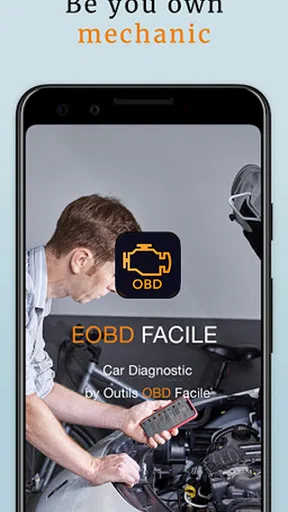
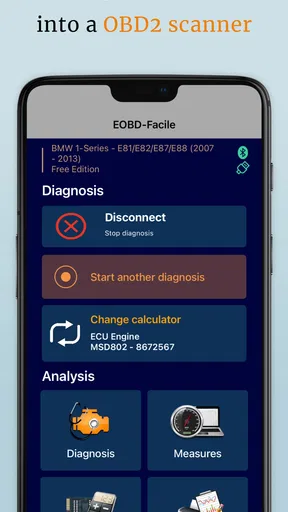
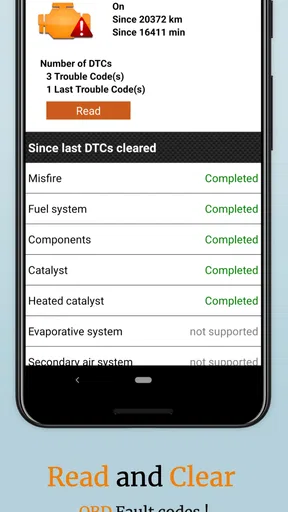
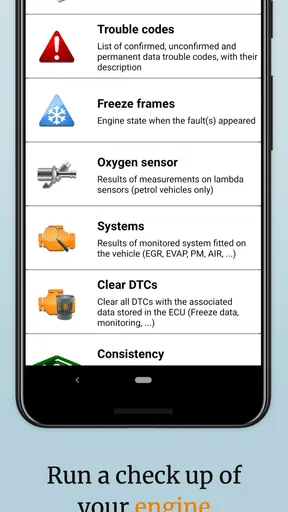
 Analysis by AppCompare
I like having a way to make sense of a warning light before deciding what to do next. That is the practical appeal of a phone-based OBD2 scanner: it can help turn an unfamiliar code into a more informed conversation with a mechanic, or point you toward a problem worth checking promptly. EOBD Facile: OBD 2 Car Scanner is built around that kind of at-home car diagnosis, though it is important to treat its readings as clues rather than a complete mechanical verdict.
It is a free Auto & Vehicles app from Outils OBD Facile, with optional in-app purchases listed at $21.99–$43.99 per item. It has a 4.2 average from around 80,000 ratings and over 5 million installs, which suggests that plenty of drivers are interested in pairing a phone with an OBD2 reader. The app is rated for Everyone, and its long-running presence—released in 2012—makes it an established option rather than a brand-new experiment.
What to decide before you download
The first practical question is not whether the app is free, but whether you already have a compatible OBD2 adapter or are willing to get one. The phone app alone cannot read a vehicle’s diagnostic port. You need the adapter as the bridge between your car and your phone, and compatibility between the adapter, vehicle, and phone matters. If you are comparing scanners, check those basics before buying hardware; a low-cost adapter that will not connect reliably can make even a capable app frustrating.
Think about what you want from a scan, too. If your goal is to understand a check-engine warning, see available diagnostic information, or keep a record to discuss later, this app’s approach makes sense. If you expect it to identify every possible fault, confirm which part has failed, or replace a hands-on inspection, no phone scanner should be treated as a substitute for that work. A fault code describes a system or condition that needs attention; it does not always name the precise cause.
Getting Started with EOBD Facile
First off, setting up the EOBD Facile: OBD 2 Car Scanner was a breeze. You just need an OBD2 adapter, which you can easily plug into your car's diagnostic port. Once that's done, you pair it with the app on your smartphone. I used my trusty Android, but it works on iOS too, so you're covered either way.
Interface and User Experience
The app's interface is pretty slick. It's got this intuitive design that even someone who's not a car geek can navigate. The dashboard is clear and straightforward, displaying all your car’s vitals without overwhelming you with data. I found myself easily flicking through different tabs to get to diagnostics, records, and more.
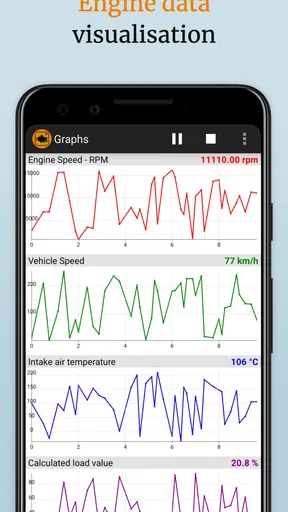
One thing that really stood out was the real-time data display. You can actually see what's happening under the hood while you're on the go. It's like having a window into your car's soul, and trust me, that's not something you get every day.
Worth Reading Before You Choose

Baby Panda World Brings Quick Play to Modern Phones, but Its Game Library Feels Busy

ESPN’s Live Game View Makes Following Close Games Easier

QuizzLand Review: A Good Fit for Short Trivia Breaks, Not Every Player

Basketball Stars: Multiplayer Is Fast, but Can It Recover When Matches Go Wrong?

WEBTOON Turns Phone Updates Into a Better Reading Routine

Link to Windows Runs on Shared Habits, Not Social Feeds
Features That Stand Out
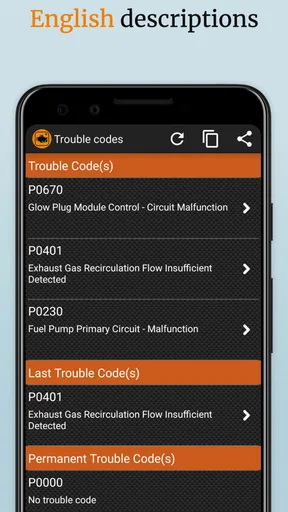
Now, let's talk features! The app reads both generic and manufacturer-specific trouble codes. This means it doesn't just tell you that something's wrong—it gives you a detailed report. I found this super helpful because it takes the guesswork out of diagnosing issues.
Another cool feature is the ability to reset the check engine light. Once you’ve fixed the problem, you can clear the code right from the app. No need to visit the mechanic just to turn off that pesky light.
- Real-time engine and vehicle performance data
- Easy-to-understand diagnostics
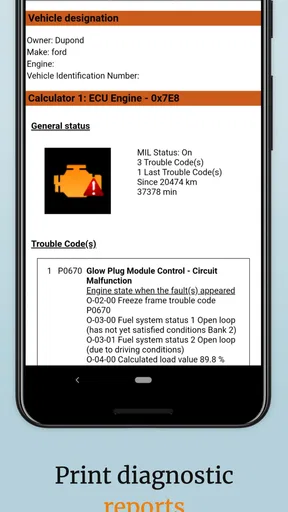
- Ability to record and save diagnostic reports
- Multi-language support
Making a scan useful in real life
A good way to use live data is to compare it with the moment a symptom occurs, rather than staring at numbers without a question in mind. If the engine warning appears during a commute, I would scan when safely parked, save the result, and note what the car was doing: whether it was idling, accelerating, or running normally. That context can make a report more useful when you later explain the issue to a garage. Do not try to operate the app while driving; a passenger can monitor information, but the driver should keep attention on the road.
Saved reports are particularly handy when a warning comes and goes. Instead of relying on memory, you can keep the diagnostic result and compare it with a later scan after the symptom returns. I would avoid clearing a code simply to make the dashboard look normal: first save what the app found and address the underlying issue. Clearing a warning is most useful after a repair or when a qualified person has advised you to do so, not as a way to dismiss an unresolved fault.
Where this kind of scanner wins—and where it does not
Compared with a basic handheld reader, a phone-based setup can be more convenient for reviewing information on a screen you already use and keeping reports together. The trade-off is that the app depends on a separate adapter and a dependable connection. A handheld tool may be the better choice if you want a dedicated device that is ready in the glove box without pairing a phone; a workshop scanner may be more appropriate when a repair requires deeper, vehicle-specific testing or functions beyond everyday code reading.
There is also a useful middle ground: use the app to arrive at a mechanic with a clearer description, not to challenge a diagnosis on the strength of one code. If the car runs roughly, loses power, overheats, or shows another serious symptom, the scan should not delay professional help. And if your vehicle or adapter does not communicate as expected, check compatibility and the connection before assuming the car has no faults. A missing reading is not proof that everything is fine.
Who should choose it, and what to expect
I would recommend it most to drivers who like understanding basic vehicle information and are comfortable following a simple adapter-and-phone setup. It can suit someone maintaining an older daily driver, a careful used-car owner who wants to keep scan notes, or a household that would rather gather useful information before calling a repair shop. The latest version is 3.83.1155, and it supports Android 5.0 and later; the app is also available for iOS, so check the relevant store and your device before installing.
It is less suitable if you want a full repair manual, a guaranteed diagnosis, or a scanner that works without extra hardware. The free download makes it easy to try the app, but some in-app purchases cost extra, so I would first confirm that the basic workflow and your adapter meet your needs before paying for anything. That is a sensible way to avoid spending on features or hardware that do not fit the job you actually have.
Performance and Reliability
In terms of performance, I found the app to be pretty reliable. The connection between the adapter and the app was stable throughout my testing. There were no noticeable lags or crashes, which is a huge plus.
The app also provides regular updates, which means you’re getting the latest tech to keep your vehicle in check. It's like having a tech-savvy friend who’s always looking out for your ride.
Is It Worth It?
So, is EOBD Facile: OBD 2 Car Scanner worth downloading? If you want peace of mind and a better understanding of your vehicle, I'd say absolutely. It empowers you to handle minor car issues yourself and potentially save some bucks in the process.
While it might not replace a professional mechanic for more complex issues, it’s an excellent tool for anyone who wants to be more involved in their car’s maintenance.
In a nutshell, this app is a game-changer for anyone who wants to keep their vehicle running smoothly without frequent trips to the shop. Give it a shot, and who knows, it might just become your new favorite car companion.
My recommendation
I see this as a useful first step, not a pocket mechanic that can settle every question about a car. Its strongest role is helping you collect diagnostic information, understand what deserves attention, and communicate more clearly when you need professional help. The adapter requirement and the limits of code-based diagnosis are real trade-offs, but for a curious driver who is willing to check compatibility and use the results sensibly, the app is an approachable place to start.
Pros
- Easy-to-use interface for beginners.
- Wide compatibility with various car models.
- Real-time diagnostics for quick insights.
- Customizable reports for detailed analysis.
- Frequent updates for improved functionality.
Cons
- Requires premium for advanced features.
- Initial setup can be a bit complex.
- Limited support for older vehicle models.
- May occasionally lag during data processing.
- Offline functionality is restricted.
FAQs for OBD2 Car Scanner - EOBD Facile
What is EOBD Facile and how does it work?
EOBD Facile is a diagnostic tool that allows users to perform vehicle diagnostics on their cars using an OBD2 scanner. By connecting the app to an OBD2 adapter, you can read and clear fault codes, monitor engine performance, and check emission levels. It's compatible with most vehicles manufactured after 2001.
Which vehicles are compatible with EOBD Facile?
EOBD Facile is compatible with all vehicles that adhere to the OBD2 standard, which typically includes cars manufactured in Europe after 2001 and in the US after 1996. It works with both petrol and diesel engines. However, it's always best to verify compatibility with your specific car model.
Is a special adapter required to use EOBD Facile?
Yes, to use EOBD Facile, you need an OBD2 Bluetooth or Wi-Fi adapter. The app connects to this adapter to communicate with your vehicle's onboard computer. Adapters are widely available online and are an essential component to utilize the app's full diagnostic capabilities.
What features does the EOBD Facile app offer?
EOBD Facile provides a comprehensive suite of features, including reading and clearing fault codes, real-time engine monitoring, and generating detailed reports. It also allows users to check emission levels and access a database of common car issues, making it a valuable tool for both novices and experienced car enthusiasts.
Is EOBD Facile user-friendly for beginners?
Yes, EOBD Facile is designed with a user-friendly interface that makes it accessible to beginners. The app provides clear explanations for diagnostic codes and step-by-step instructions for usage. Additionally, it offers customer support and detailed guides to help users navigate the app effectively.


